日志
- 应用程序日志:记录应用程序运行中的事件,例如崩溃或文件错误。默认路径为 C:\Windows\System32\Winevt\Logs\Application.evtx。
- 系统日志:记录操作系统组件的事件,如驱动程序错误或硬件故障。默认路径为 C:\Windows\System32\Winevt\Logs\System.evtx。
- 安全日志:记录安全相关事件,包括登录尝试、权限变更等。默认路径为 C:\Windows\System32\Winevt\Logs\Security.evtx。
1. 事件ID
| 序号 |
事件ID |
说明 |
| 1. |
1102 |
清理审计日志 |
| 2. |
4624 |
账号成功登录 |
| 3. |
4625 |
账号登录失败 |
| 4. |
4768 |
Kerberos身份验证(TGT请求) |
| 5. |
4769 |
Kerberos服务票证请求 |
| 6. |
4776 |
NTLM身份验证 |
| 7. |
4672 |
授予特殊权限 |
| 8. |
4720 |
创建用户 |
| 9. |
4722 |
启用用户 |
| 10. |
4726 |
删除用户 |
| 11. |
4728 |
将成员添加到启用安全的全局组中 |
| 12. |
4729 |
将成员从安全的全局组中移除 |
| 13. |
4732 |
将成员添加到启用安全的本地组中 |
| 14. |
4733 |
将成员从启用安全的本地组中移除 |
| 15. |
4756 |
将成员添加到启用安全的通用组中 |
| 16. |
4757 |
将成员从启用安全的通用组中移除 |
| 17. |
4719 |
系统审计策略修改 |
4648 显式凭证登录
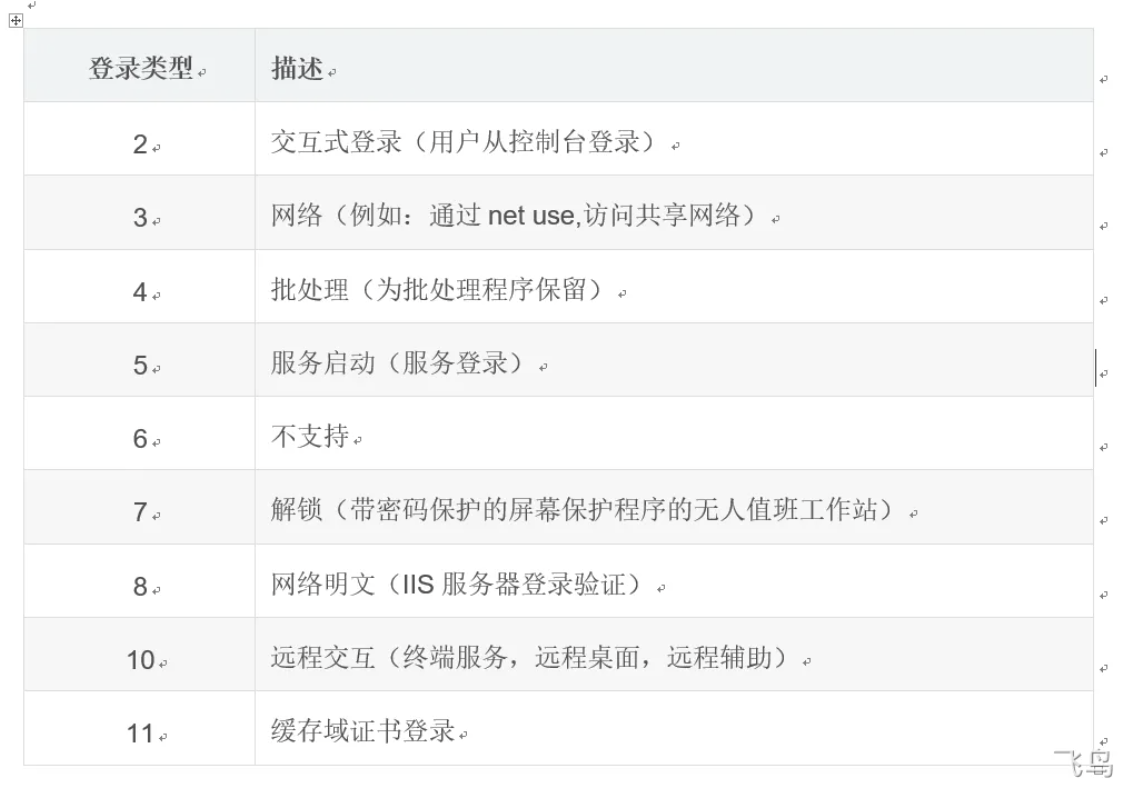
关于4624 的几种状态

ai补充说明
总结表格
| 登录类型 |
名称 |
核心描述 |
典型场景 |
安全关注点 |
| 2 |
交互式 |
在本地控制台登录 |
本地开机登录、切换用户 |
物理服务器访问、异常用户 |
| 3 |
网络 |
访问网络资源 |
访问文件共享、网络打印机 |
文件服务器访问、异常共享连接 |
| 4 |
批处理 |
由计划任务触发 |
计划任务(以特定用户运行) |
恶意脚本、异常任务 |
| 5 |
服务 |
服务启动 |
Windows 服务启动 |
服务账户滥用、权限提升 |
| 7 |
解锁 |
解锁已锁定的会话 |
电脑锁屏后重新登录 |
正常行为,通常与类型2关联 |
| 8 |
网络明文 |
使用明文密码网络登录 |
IIS 基本认证、老旧协议 |
高风险,凭据可被嗅探 |
| 9 |
新凭证 |
RunAs /netonly |
管理员网络管理 |
权限分离,注意双重身份 |
| 10 |
远程交互 |
通过RDP登录 |
远程桌面连接 |
关键入口,监控来源IP和账户 |
| 11 |
缓存交互 |
使用本地缓存凭据登录 |
笔记本电脑离线登录域 |
缓存凭据可被攻击者提取 |
sysmon
事件ID以及含义
| 序号 |
ID |
Tag |
| 1 |
ProcessCreate |
Process Create |
| 2 |
FileCreateTime |
File creation time |
| 3 |
NetworkConnect |
Network connection detected |
| 4 |
n/a |
Sysmon service state change (cannot be filtered) |
| 5 |
ProcessTerminate |
Process terminated |
| 6 |
DriverLoad |
Driver Loaded |
| 7 |
ImageLoad |
Image loaded |
| 8 |
CreateRemoteThread |
CreateRemoteThread detected |
| 9 |
RawAccessRead |
RawAccessRead detected |
| 10 |
ProcessAccess |
Process accessed |
| 11 |
FileCreate |
File created |
| 12 |
RegistryEvent |
Registry object added or deleted |
| 13 |
RegistryEvent |
Registry value set |
| 14 |
RegistryEvent |
Registry object renamed |
| 15 |
FileCreateStreamHash |
File stream created |
| 16 |
n/a |
Sysmon configuration change (cannot be filtered) |
| 17 |
PipeEvent |
Named pipe created |
| 18 |
PipeEvent |
Named pipe connected |
| 19 |
WmiEvent |
WMI filter |
| 20 |
WmiEvent |
WMI consumer |
| 21 |
WmiEvent |
WMI consumer filter |
| 22 |
DNSQuery |
DNS query |
配置
1
2
| sysmon -accepteula -i
sysmon64.exe -c config.xml
|
xml文件
1
2
3
4
5
6
7
8
9
10
11
12
13
14
15
16
17
18
19
20
21
22
23
24
25
26
27
28
29
30
31
32
33
34
35
36
37
38
39
40
41
42
43
44
45
46
47
48
49
50
51
52
53
54
55
56
57
58
59
60
61
62
63
64
65
66
67
68
69
70
71
72
73
74
75
76
77
78
79
80
81
82
83
84
85
86
87
88
89
90
91
92
93
94
95
96
97
98
99
100
101
102
103
104
105
106
107
108
109
110
111
112
113
114
115
116
117
118
119
120
121
122
123
124
125
126
127
128
129
130
131
132
133
134
135
136
137
138
139
140
141
142
143
144
145
146
147
148
149
150
151
152
153
154
155
156
157
158
159
160
161
162
163
164
165
166
167
168
169
170
171
172
173
174
175
176
177
178
179
180
181
182
183
184
185
186
187
188
189
190
191
192
193
194
195
| <Sysmon schemaversion="4.32">
<!-- Capture all hashes -->
<HashAlgorithms>*</HashAlgorithms>
<DnsLookup>False</DnsLookup>
<ArchiveDirectory>Archive</ArchiveDirectory>
<EventFiltering>
<RuleGroup name="" groupRelation="or">
<!-- Event ID 1 == Process Creation. Log all newly created processes except -->
<ProcessCreate onmatch="exclude">
<Image condition="contains">splunk</Image>
<Image condition="contains">btool.exe</Image>
<Image condition="contains">SnareCore</Image>
<Image condition="contains">nxlog</Image>
<Image condition="contains">winlogbeat</Image>
<Image condition="contains">Microsoft Monitoring Agent\Agent\MonitoringHost.exe</Image>
<Image condition="begin with">C:\Program Files\NVIDIA Corporation\Display\</Image>
<Image condition="is">C:\Program Files\Dell\SupportAssist\pcdrcui.exe</Image>
<Image condition="is">C:\Program Files\Dell\SupportAssist\koala.exe</Image>
<Image condition="begin with">C:\Program Files\Windows Defender</Image>
<Image condition="is">C:\Windows\System32\audiodg.exe</Image>
<Image condition="is">C:\Windows\SysWOW64\Macromed\Flash\FlashPlayerUpdateService.exe</Image>
<Image condition="is">C:\Program Files (x86)\Google\Update\GoogleUpdate.exe</Image>
<Image condition="end with">Sysmon.exe</Image>
<Image condition="end with">ec2config.exe</Image>
<CommandLine condition="begin with">C:\WIndows\System32\poqexec.exe /noreboot /transaction</CommandLine>
</ProcessCreate>
</RuleGroup>
<RuleGroup name="" groupRelation="or">
<!-- Event ID 2 == File Creation Time. POC - Log file modified creation time -->
<FileCreateTime onmatch="exclude"/>
</RuleGroup>
<RuleGroup name="" groupRelation="or">
<!-- Event ID 3 == Network Connection. Log all initiated network connection except -->
<NetworkConnect onmatch="exclude">
<Image condition="is">C:\Program Files\Microsoft Office\Office15\ONENOTE.EXE</Image>
<Image condition="end with">Spotify.exe</Image>
<Image condition="end with">OneDrive.exe</Image>
<Image condition="end with">AppData\Roaming\Dashlane\Dashlane.exe</Image>
<Image condition="end with">AppData\Roaming\Dashlane\DashlanePlugin.exe</Image>
<Image condition="end with">winlogbeat.exe</Image>
<Image condition="end with">ec2config.exe</Image>
<Image condition="end with">cfn-signal.exe</Image>
<Image condition="end with">amazon-ssm-agent.exe</Image>
<Image condition="end with">ec2wallpaperinfo.exe</Image>
<Image condition="is">C:\Windows\System32\spoolsv.exe</Image>
<Image condition="is">C:\Program Files\Common Files\microsoft shared\ClickToRun\OfficeClickToRun.exe</Image>
<Image condition="is">C:\Program Files (x86)\Common Files\Acronis\SyncAgent\syncagentsrv.exe</Image>
<Image condition="is">C:\Windows\SystemApps\Microsoft.Windows.Cortana_cw5n1h2txyewy\SearchUI.exe</Image>
<Image condition="is">C:\Windows\System32\CompatTelRunner.exe</Image>
<Image condition="is">C:\Program Files (x86)\Intel\Intel(R) Management Engine Components\LMS\LMS.exe</Image>
<Image condition="is">C:\Program Files (x86)\Google\Chrome\Application\chrome.exe</Image>
<Image condition="is">C:\Windows\System32\mmc.exe</Image>
<Image condition="is">C:\Program Files\Microsoft VS Code\Code.exe</Image>
<Image condition="is">C:\Program Files\Microsoft Monitoring Agent\Agent\HealthService.exe</Image>
<Image condition="begin with">C:\Packages\Plugins\</Image> <!--Azure ARM Extensions -->
<Image condition="begin with">C:\WindowsAzure\</Image> <!--Azure -->
<DestinationIp condition="is">10.0.1.10</DestinationIp> <!--Mordor APT29 Evals: Windows Event Collector-->
</NetworkConnect>
</RuleGroup>
<RuleGroup name="" groupRelation="or">
<!-- Event ID 5 == Process Terminated. Log processes terminated -->
<ProcessTerminate onmatch="exclude" />
</RuleGroup>
<RuleGroup name="" groupRelation="or">
<!-- Event ID 6 == Driver Loaded. Log all drivers except those with the following signatures -->
<DriverLoad onmatch="exclude">
<Signature condition="contains">microsoft</Signature>
<Signature condition="contains">windows</Signature>
<Signature condition="is">VMware</Signature>
<Signature condition="begin with">Intel </Signature>
</DriverLoad>
</RuleGroup>
<RuleGroup name="" groupRelation="or">
<!-- Event ID 7 == Image Loaded. Log everything except -->
<ImageLoad onmatch="exclude">
<Image condition="image">chrome.exe</Image>
<Image condition="image">vmtoolsd.exe</Image>
<Image condition="image">Sysmon.exe</Image>
<Image condition="image">mmc.exe</Image>
<Image condition="is">C:\Program Files (x86)\Google\Update\GoogleUpdate.exe</Image>
<Image condition="is">C:\Windows\System32\taskeng.exe</Image>
<Image condition="is">C:\Program Files\VMware\VMware Tools\TPAutoConnect.exe</Image>
<Image condition="is">C:\Program Files\Windows Defender\NisSrv.exe</Image>
<Image condition="is">C:\Program Files\Windows Defender\MsMpEng.exe</Image>
<Image condition="end with">onedrivesetup.exe</Image>
<Image condition="end with">onedrive.exe</Image>
<Image condition="end with">skypeapp.exe</Image>
<Image condition="begin with">C:\Packages\Plugins\</Image> <!--Azure ARM Extensions -->
<Image condition="begin with">C:\WindowsAzure\</Image> <!--Azure -->
</ImageLoad>
</RuleGroup>
<RuleGroup name="" groupRelation="or">
<!-- Event ID 8 == CreateRemoteThread. Log everything except -->
<CreateRemoteThread onmatch="exclude" />
</RuleGroup>
<RuleGroup name="" groupRelation="or">
<!-- Event ID 9 == RawAccessRead. Log everything except -->
<RawAccessRead onmatch="exclude">
<Image condition="is">C:\Program Files\VMware\VMware Tools\vmtoolsd.exe</Image>
<Image condition="is">C:\Program Files (x86)\Google\Update\GoogleUpdate.exe</Image>
<Image condition="end with">\Sysmon.exe</Image>
</RawAccessRead>
</RuleGroup>
<RuleGroup name="" groupRelation="or">
<!-- Event ID 10 == ProcessAccess. Log everything except -->
<ProcessAccess onmatch="exclude">
<SourceImage condition="is">C:\Program Files\VMware\VMware Tools\vmtoolsd.exe</SourceImage>
<SourceImage condition="image">Sysmon.exe</SourceImage>
<SourceImage condition="image">GoogleUpdate.exe</SourceImage>
<SourceImage condition="is">C:\Program Files (x86)\Google\Chrome\Application\chrome.exe</SourceImage>
<SourceImage condition="is">C:\Program Files\Windows Defender\MsMpEng.exe</SourceImage>
<SourceImage condition="is">C:\ProgramData\Microsoft\Windows Defender\platform\4.18.1907.4-0\MsMpEng.exe</SourceImage>
<SourceImage condition="is">C:\Program Files\Microsoft VS Code\Code.exe</SourceImage>
<SourceImage condition="end with">onedrivesetup.exe</SourceImage>
<SourceImage condition="is">C:\WindowsAzure\Packages\CollectGuestLogs.exe</SourceImage>
<SourceImage condition="is">C:\Program Files\Microsoft Monitoring Agent\Agent\HealthService.exe</SourceImage>
<SourceImage condition="is">C:\Program Files\Microsoft Monitoring Agent\Agent\MonitoringHost.exe</SourceImage>
<TargetImage condition="is">C:\Program Files\VMware\VMware Tools\TPAutoConnSvc.exe</TargetImage>
<TargetImage condition="is">C:\Program Files\VMware\VMware Tools\TPAutoConnect.exe</TargetImage>
<TargetImage condition="is">C:\Program Files\Microsoft VS Code\Code.exe</TargetImage>
<TargetImage condition="is">C:\Program Files\Windows Defender\MsMpEng.exe</TargetImage>
<TargetImage condition="is">c:\Program Files\Microsoft VS Code\resources\app\out\vs\workbench\services\files\node\watcher\win32\CodeHelper.exe</TargetImage>
<TargetImage condition="is">C:\Program Files\Amazon\Ec2ConfigService\Ec2Config.exe</TargetImage>
<TargetImage condition="is">C:\Program Files\Microsoft Monitoring Agent\Agent\HealthService.exe</TargetImage>
<TargetImage condition="is">C:\windows\system32\CompatTelRunner.exe</TargetImage>
<TargetImage condition="begin with">C:\Packages\Plugins\</TargetImage> <!--Azure ARM Extensions -->
<TargetImage condition="begin with">C:\WindowsAzure\</TargetImage> <!--Azure -->
<TargetImage condition="begin with">C:\Program Files\WindowsApps\</TargetImage>
</ProcessAccess>
</RuleGroup>
<RuleGroup name="" groupRelation="or">
<!-- Event ID 11 == FileCreate. Log everything except -->
<FileCreate onmatch="exclude">
<Image condition="image">SearchIndexer.exe</Image>
<Image condition="image">winlogbeat.exe</Image>
<Image condition="is">C:\Program Files (x86)\Google\Chrome\Application\chrome.exe</Image>
<Image condition="is">C:\Program Files\Microsoft VS Code\Code.exe</Image>
<Image condition="end with">onedrivesetup.exe</Image>
<Image condition="end with">onedrive.exe</Image>
<Image condition="end with">skypeapp.exe</Image>
<Image condition="begin with">C:\Packages\Plugins\</Image> <!--Azure ARM Extensions -->
<Image condition="begin with">C:\WindowsAzure\</Image> <!--Azure -->
<TargetFilename condition="begin with">C:\Windows\System32\winevt\Logs\</TargetFilename>
</FileCreate>
</RuleGroup>
<RuleGroup name="" groupRelation="or">
<!-- Event ID 12,13,14 == RegObject added/deleted, RegValue Set, RegObject Renamed. Log everything except -->
<RegistryEvent onmatch="exclude">
<Image condition="is">C:\Program Files\VMware\VMware Tools\vmtoolsd.exe</Image>
<Image condition="image">Sysmon.exe</Image>
<Image condition="image">GoogleUpdate.exe</Image>
<Image condition="is">C:\Program Files\VMware\VMware Tools\TPAutoConnect.exe</Image>
<Image condition="is">C:\Program Files\Windows Defender\NisSrv.exe</Image>
<Image condition="end with">onedrivesetup.exe</Image>
<Image condition="end with">onedrive.exe</Image>
<Image condition="end with">skypeapp.exe</Image>
<Image condition="is">C:\Program Files\Microsoft Monitoring Agent\Agent\HealthService.exe</Image>
<Image condition="is">C:\windows\system32\AUDIODG.EXE</Image>
<TargetObject condition="is">\REGISTRY\MACHINE\SOFTWARE\Microsoft\Windows NT\CurrentVersion\Print\Printers\Microsoft Print to PDF\PrinterDriverData</TargetObject>
<TargetObject condition="end with">LanguageList</TargetObject>
</RegistryEvent>
</RuleGroup>
<RuleGroup name="" groupRelation="or">
<!-- Event ID 15 == FileStream Created. Do not log when a file stream is created neither the hash of the contents of the stream -->
<FileCreateStreamHash onmatch="exclude" />
</RuleGroup>
<RuleGroup name="" groupRelation="or">
<!-- Event ID 17,18 == PipeEvent. Log Named pipe created & Named pipe connected -->
<PipeEvent onmatch="exclude">
<Image condition="begin with">C:\Packages\Plugins\</Image> <!--Azure ARM Extensions -->
<Image condition="begin with">C:\WindowsAzure\</Image> <!--Azure -->
<Image condition="is">C:\Program Files\Microsoft Monitoring Agent\Agent\MonitoringHost.exe</Image>
</PipeEvent>
</RuleGroup>
<RuleGroup name="" groupRelation="or">
<!-- Event ID 19,20,21, == WmiEvent. Log all WmiEventFilter, WmiEventConsumer, WmiEventConsumerToFilter activity-->
<WmiEvent onmatch="exclude"/>
</RuleGroup>
<RuleGroup name="" groupRelation="or">
<!--Event ID 22 == DNS Query-->
<DnsQuery onmatch="exclude">
<Image condition="is">C:\Program Files (x86)\nxlog\nxlog.exe</Image>
</DnsQuery>
</RuleGroup>
<RuleGroup name="" groupRelation="or">
<!--Event ID 23 == File Delete-->
<FileDelete onmatch="include">
<TargetFilename condition="begin with">C:\Users\</TargetFilename>
<TargetFilename condition="begin with">C:\ProgramData\</TargetFilename>
<TargetFilename condition="begin with">C:\Windows\Temp\</TargetFilename>
<TargetFilename condition="begin with">C:\Program Files\</TargetFilename>
</FileDelete>
</RuleGroup>
</EventFiltering>
</Sysmon>
|
1
2
3
| # 查找特定进程的PID
tasklist | findstr "进程名"
Get-Process -Id 进程PID
|
windows 木马应急响应分析
netstat 查看法
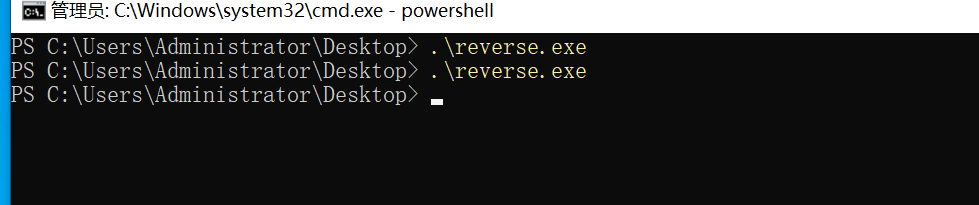
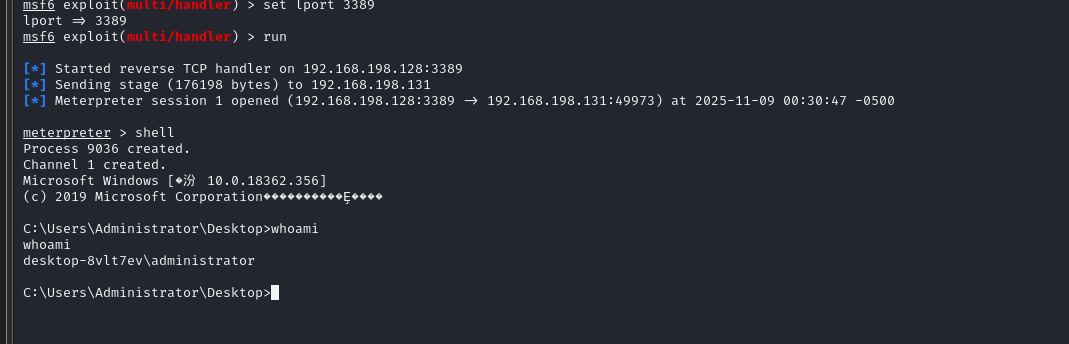
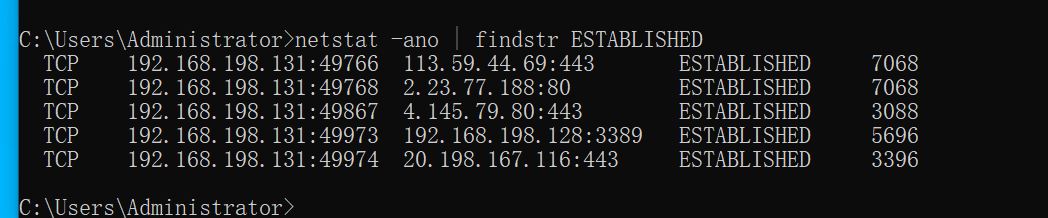
执行了一个最简单的反弹shell 木马
这是我们查看端口连接情况是能够看到的
1
| netstat -ano | findstr ESTABLISHED
|
其他策略可以发现一些蛛丝马迹吗
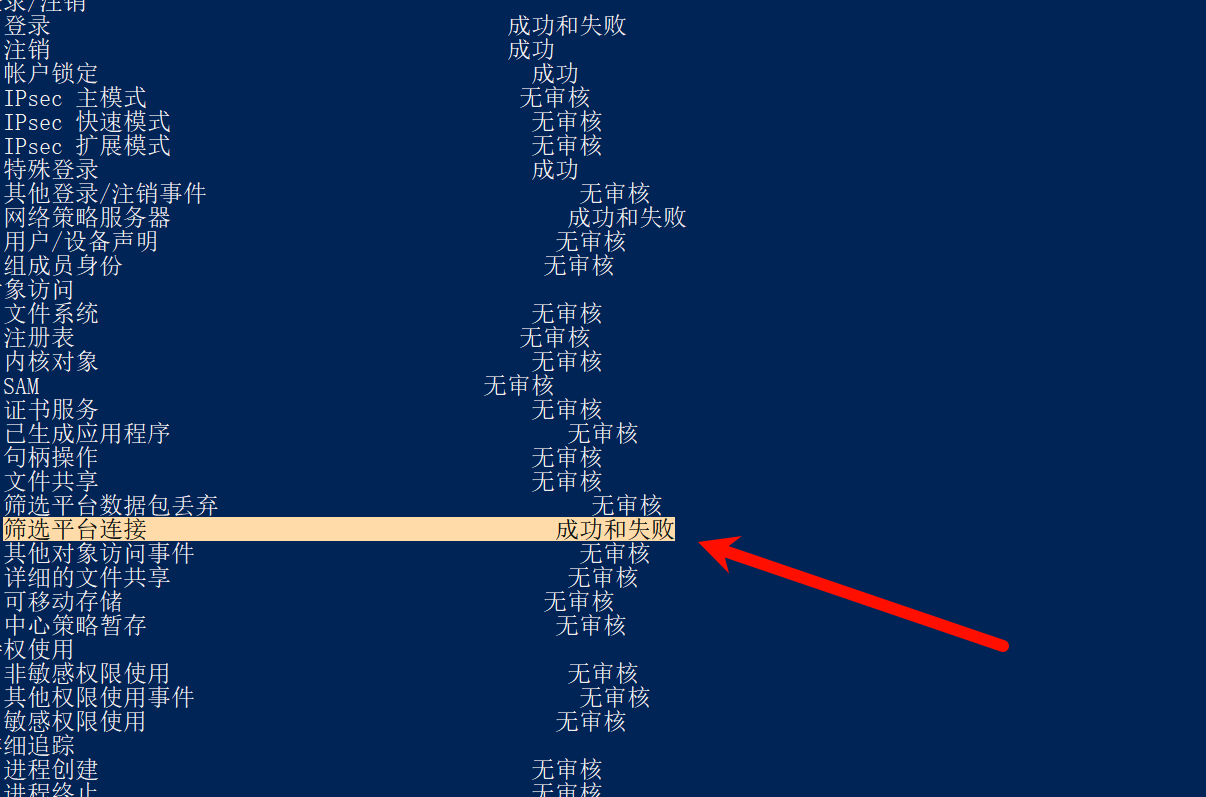
先查看开启了哪些日志记录功能
1
| auditpol /get /category:*
|
1
2
| 没开启可以设置开启
auditpol /set /subcategory:"筛选平台连接" /success:enable /failure:enable
|
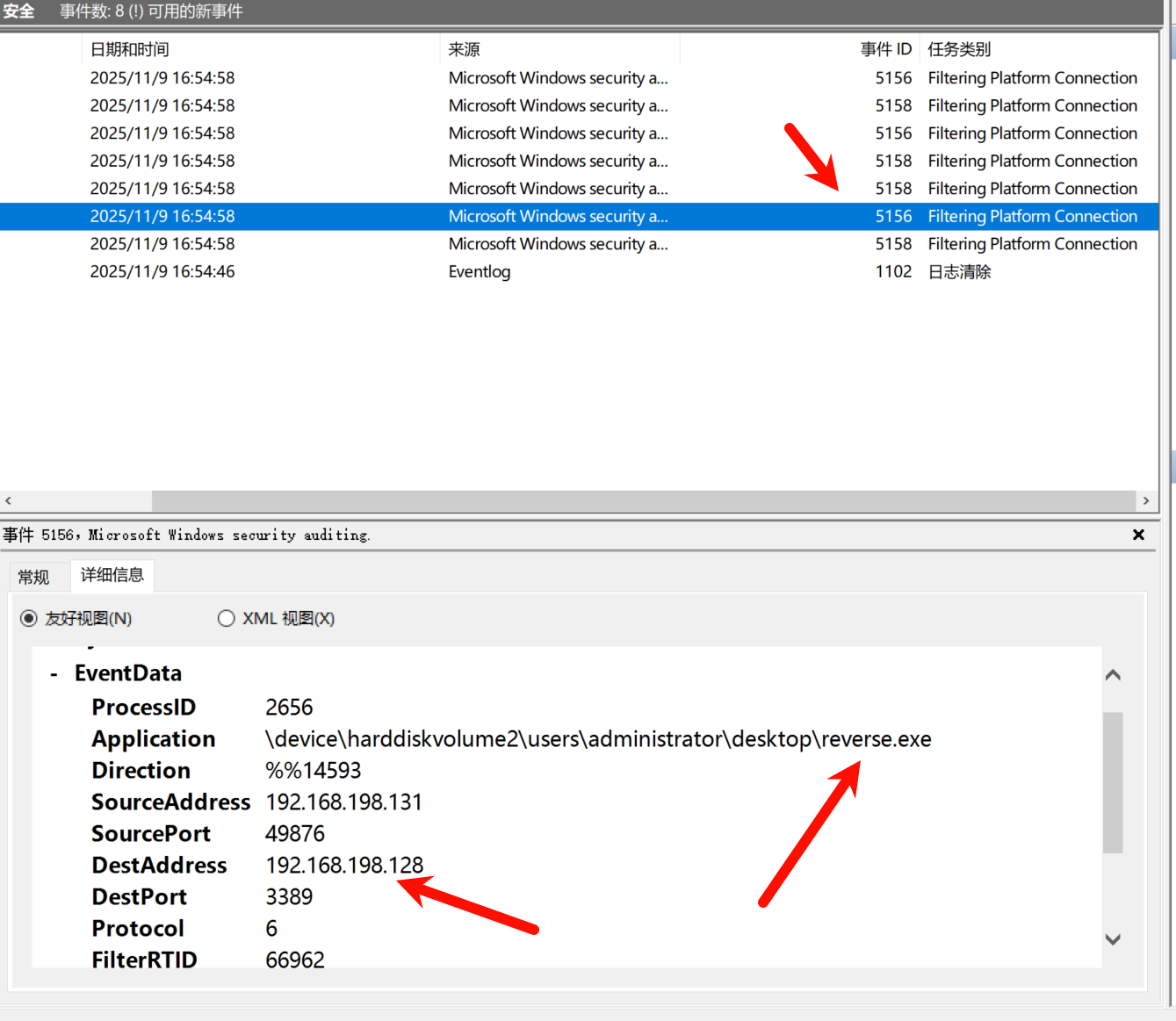
事件ID 5156: Windows筛选平台已允许连接
事件描述:
当Windows Filtering Platform (WFP) 允许一个网络连接通过时生成此事件。这包括了所有成功的出站和入站网络连接。
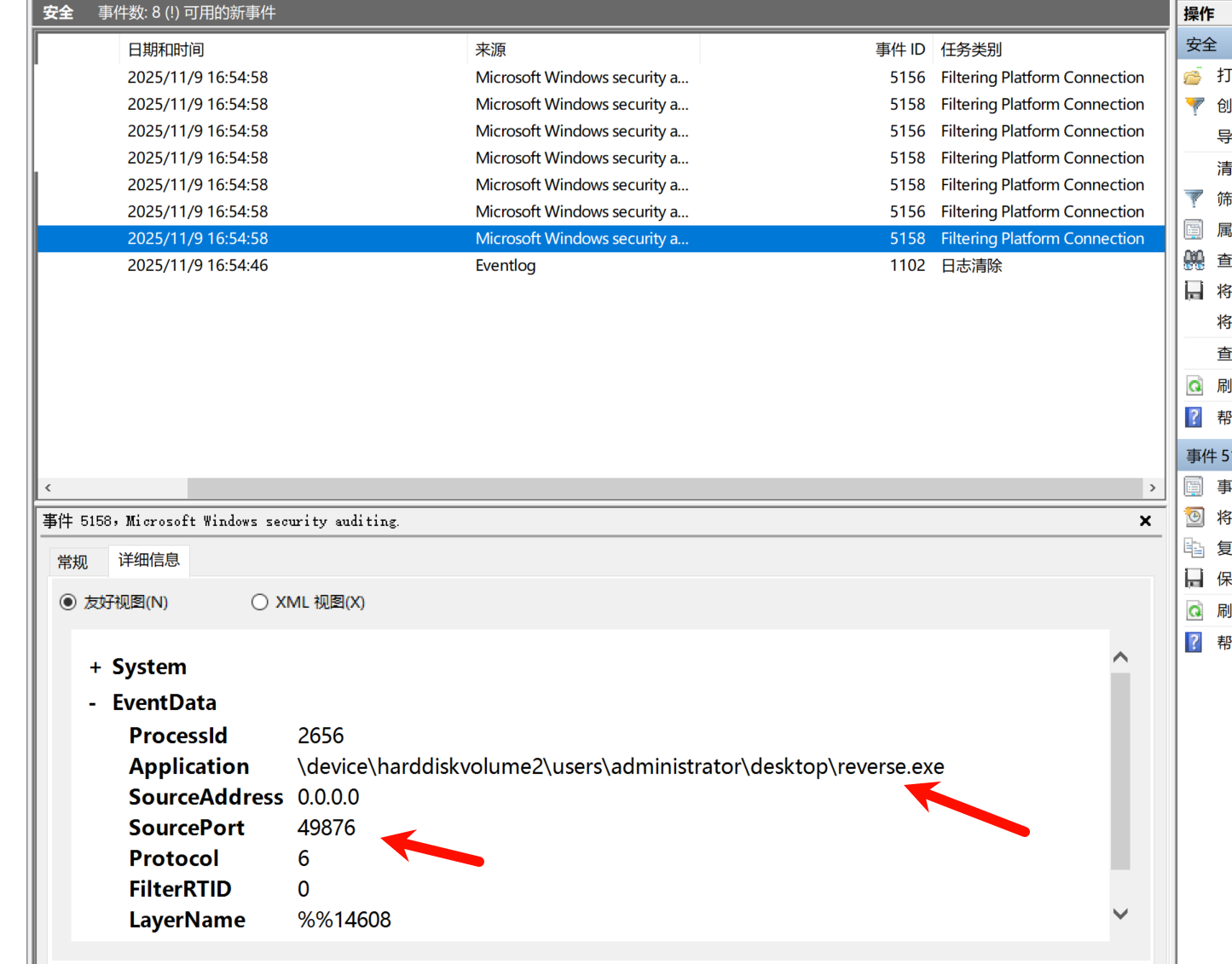
事件ID 5158: Windows筛选平台已允许绑定到本地端口
事件描述:
当应用程序被允许绑定到本地端口进行监听时生成此事件。这表示应用程序正在创建网络服务或监听传入连接。
这两个事件日志也是能查看到的
不过这个日志开启的化会有很多杂包
查看定时任务
或者
克隆账号的原理
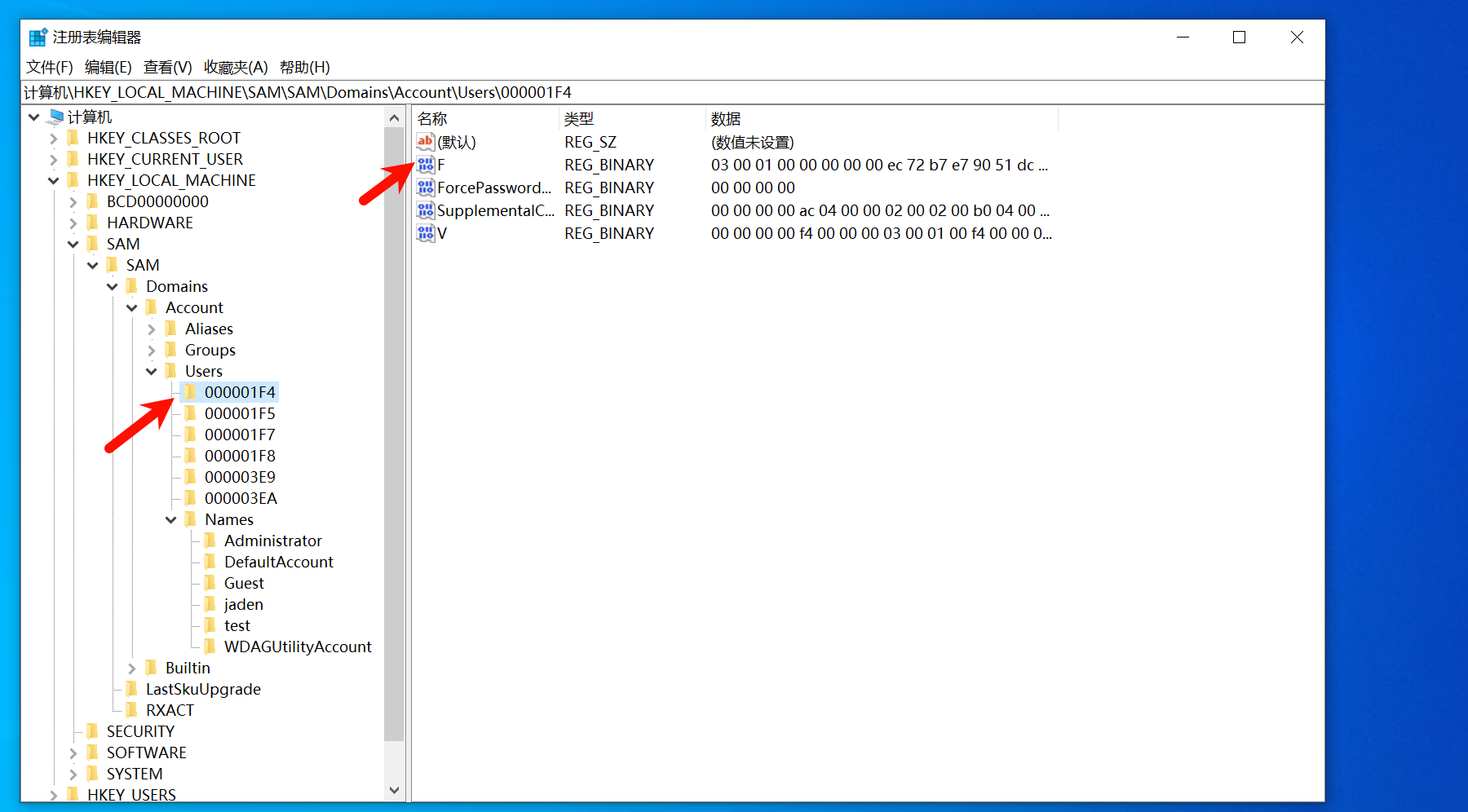
1.克隆账号的原理
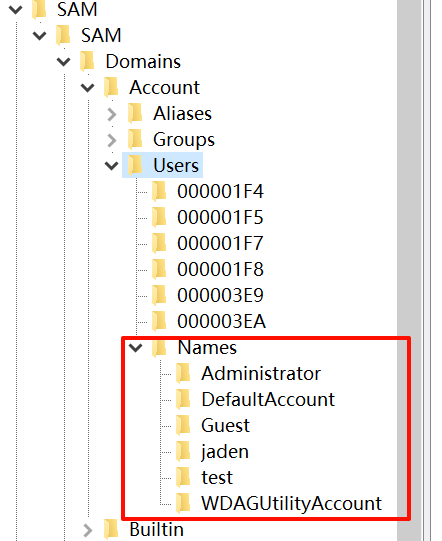
在注册表中有两处保存了账号的SID相对标志符,一处是注册表HKEY_LOCAL_MACHINE\SAM\AMDomains\AccountUsers 下的子键名。
另一处是该子键的子项F的值
但微软犯了个不同步它们的错误,登录时用的是后者,查询时用前者。当用Administrator的F项覆盖其他账号的F项后,就造成了账号是管理员权限,但查询还是原来状态的情况,这就是所谓的克隆账号
windows停止日志,以及清楚
1
2
3
4
5
6
7
8
9
10
11
| 使用powershell来找到相关的PID,通过关闭PID来关闭服务
Get-WmiObject -Class win32_service -Filter "name = 'eventlog'"
再使用taskkill来关闭相关的PID
taskkill /F /PID 1540
清除日志
wevtutil cl System
wevtutil cl Application
wevtutil cl Security
wevtutil cl Setup
|
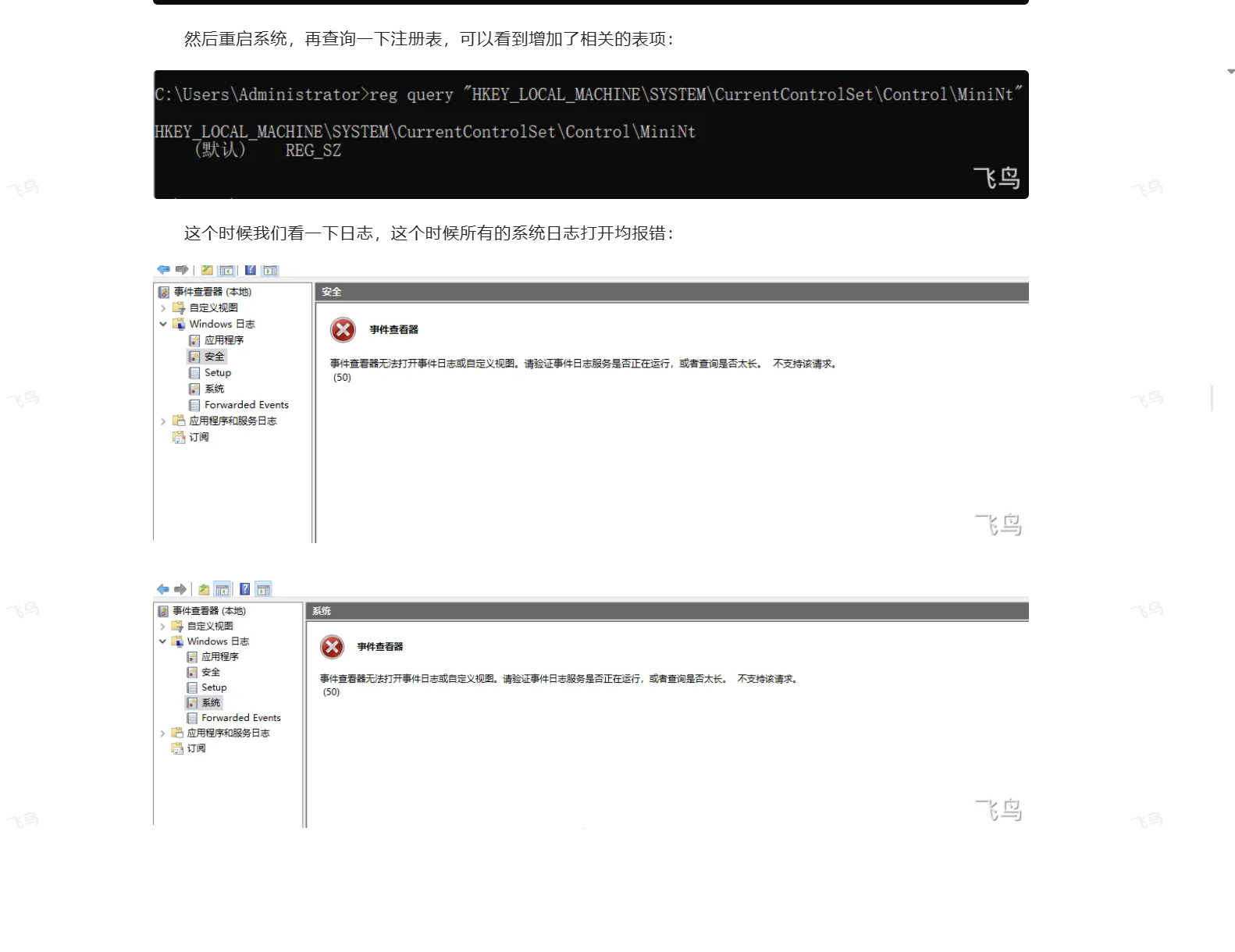
破坏日志
1
| reg add "HKEY_LOCAL_MACHINE\SYSTEM\CurrentControlSet\Control\MiniNt"
|
进程分析